# GSA SxS Checker — Detect WFP Driver Conflicts With the Global Secure Access Client
> Detect WFP driver conflicts with the Microsoft Global Secure Access client — one PowerShell command, self-contained HTML report with risk scoring and remediation for 32 vendor signatures.
- Author: Jeevan Bisht
- Published: 2026-06-09
- Tags: security, windows, powershell, identity, gsa, entrasuite
---
**GSA SxS Checker** is a free, open-source PowerShell tool that detects [Windows Filtering Platform (WFP)](https://learn.microsoft.com/en-us/windows/win32/fwp/windows-filtering-platform-start-page) driver conflicts with the [Microsoft Global Secure Access](https://learn.microsoft.com/en-us/entra/global-secure-access/) client — in one command, with zero dependencies. If you've ever seen a GSA tunnel fail with no obvious error, or you're planning a rollout and want to pre-screen devices for known conflicts before they become incidents, this tool automates what would otherwise take hours of manual investigation.
## The problem: two drivers, one set of network layers
The Microsoft Global Secure Access (GSA) client operates as a kernel-mode Windows Filtering Platform (WFP) callout driver. It sits at the `FWPM_LAYER_ALE_CONNECT_REDIRECT_V4/V6` layers and intercepts outbound connections to tunnel them through your Entra-joined identity — for M365 traffic, private app access, and internet filtering.
That works perfectly in isolation — until another security or network product claims the same WFP layers. Endpoint agents from VPN vendors, SSE platforms, CASB tools, and endpoint security suites all have to hook into the network stack somewhere, and WFP callouts are a favourite spot. For several of the most common ones — Cisco, Palo Alto Networks, Zscaler, and Netskope — Microsoft has published [official coexistence guides](#official-microsoft-coexistence-guidance), but many others have no documented guidance at all. When two drivers compete at the same layers, the results range from subtle to catastrophic:
- Tunnels silently fail to establish
- Traffic gets dropped without any obvious error
- Specific apps stop working while others seem fine
The hard part is that these conflicts don't always generate a clear error. The GSA client shows a tunnel in a bad state, but the logs don't tell you *which* kernel driver is competing with it. Correlating WFP callout data with running drivers is a manual, error-prone process that usually requires escalating to engineering.
> The GSA client uses a kernel-mode WFP callout driver to intercept and tunnel network traffic. Other security or network access products may register WFP callouts at the same network layers, sometimes leading to conflicts.
>
> — [More Info](https://learn.microsoft.com/en-us/entra/global-secure-access/troubleshoot-global-secure-access-client-advanced-diagnostics)
[GSA SxS Checker](https://github.com/jeevanbisht/GSASxSChecker) automates that whole investigation into one command.
## Why I built it
Debugging WFP conflict issues in the field often meant spending several hours gathering driver lists, cross-referencing vendor documentation, and then writing up findings in a format the customer could act on. The same problem came up repeatedly across different environments — and to make it harder, most endpoint admins aren't aware that WFP callout conflicts are even a thing until a tunnel is already broken. This isn't a GSA bug; it's a fundamental Windows networking challenge that affects any kernel-mode callout driver sharing layers with another product.
This script collapses that investigation into under a minute and produces a report that can go straight to a change advisory board or a ticket. It's also useful during GSA *pre-deployment* — run it before you roll out the client to surface conflicts proactively rather than discovering them at 2am when tunnels start failing.
The vendor signature database is the living part. If you deploy a product that isn't covered yet, contributions are welcome via [CONTRIBUTING.md](https://github.com/jeevanbisht/GSASxSChecker/blob/master/CONTRIBUTING.md).
## What it produces
Run the script as Administrator and it generates a self-contained, interactive HTML report — no internet required, no server, no dependencies. The report opens automatically in your browser and is organised into six tabs:
| Tab | What you see |
| --- | --- |
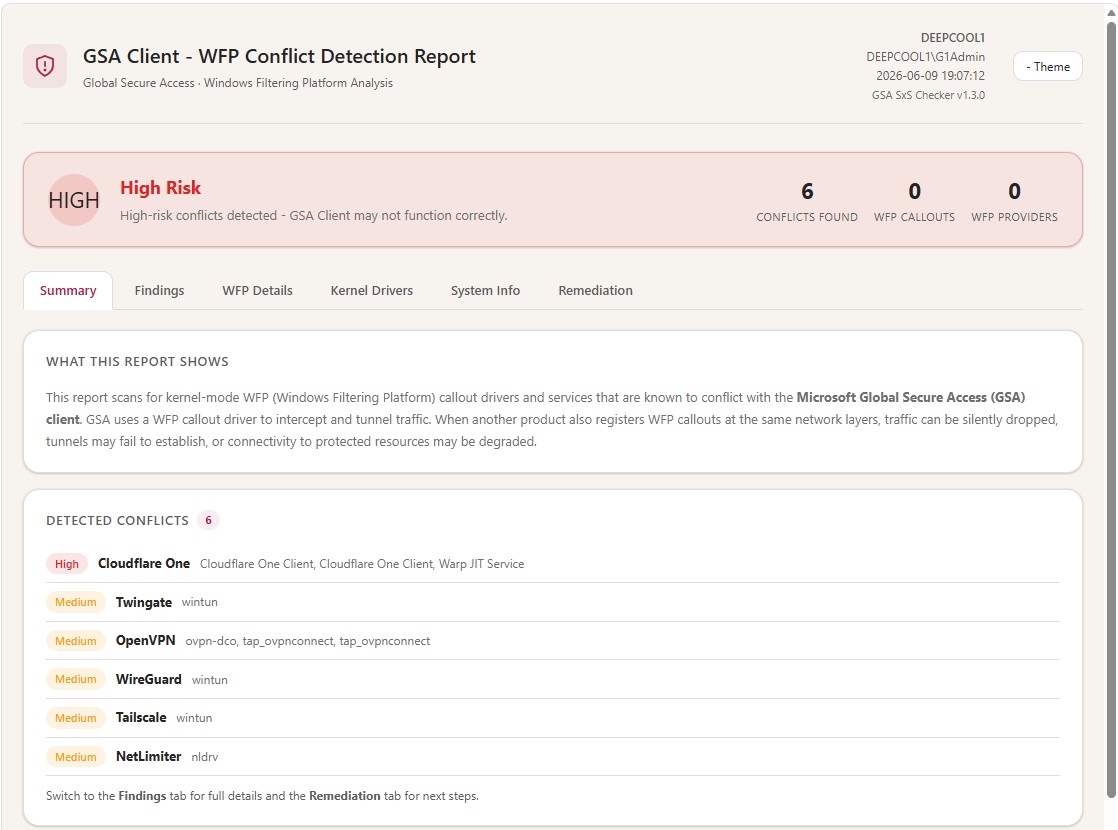
| **Summary** | Risk banner (None / Low / Medium / High), machine snapshot, quick conflict count |
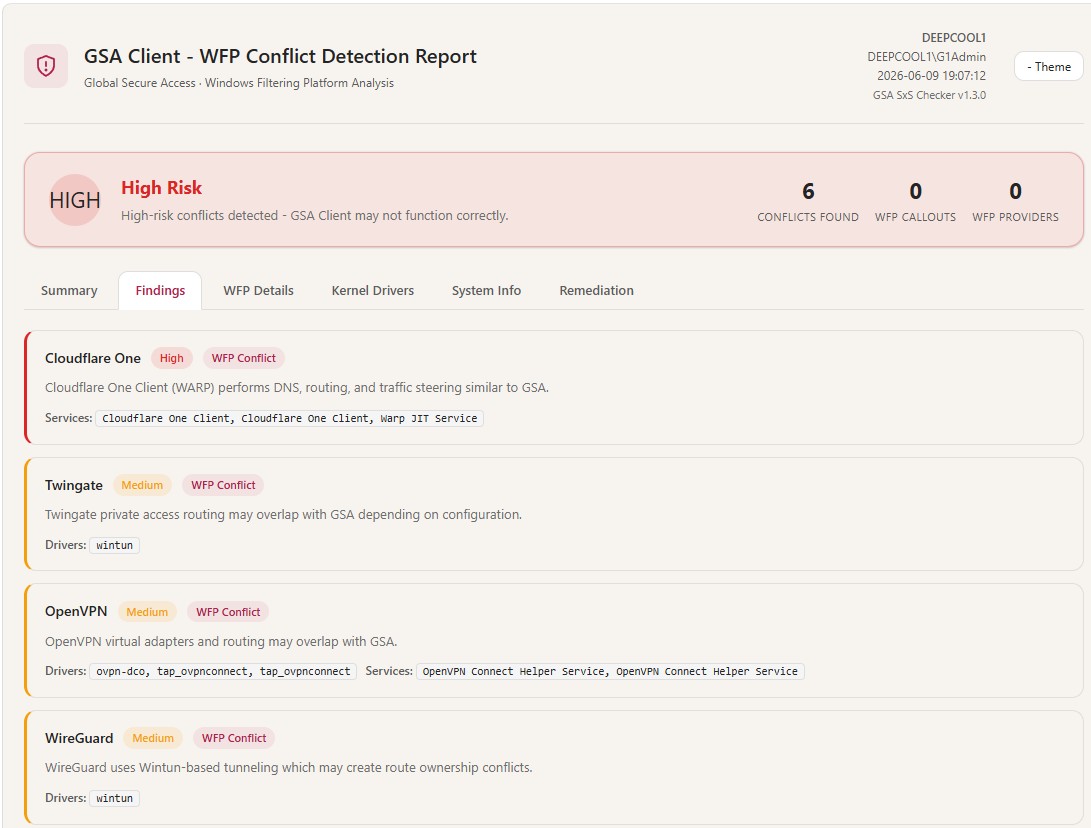
| **Findings** | Per-vendor risk level, matched drivers/services, conflict description |
| **WFP Details** | Raw WFP callout drivers and providers (admin-only) |
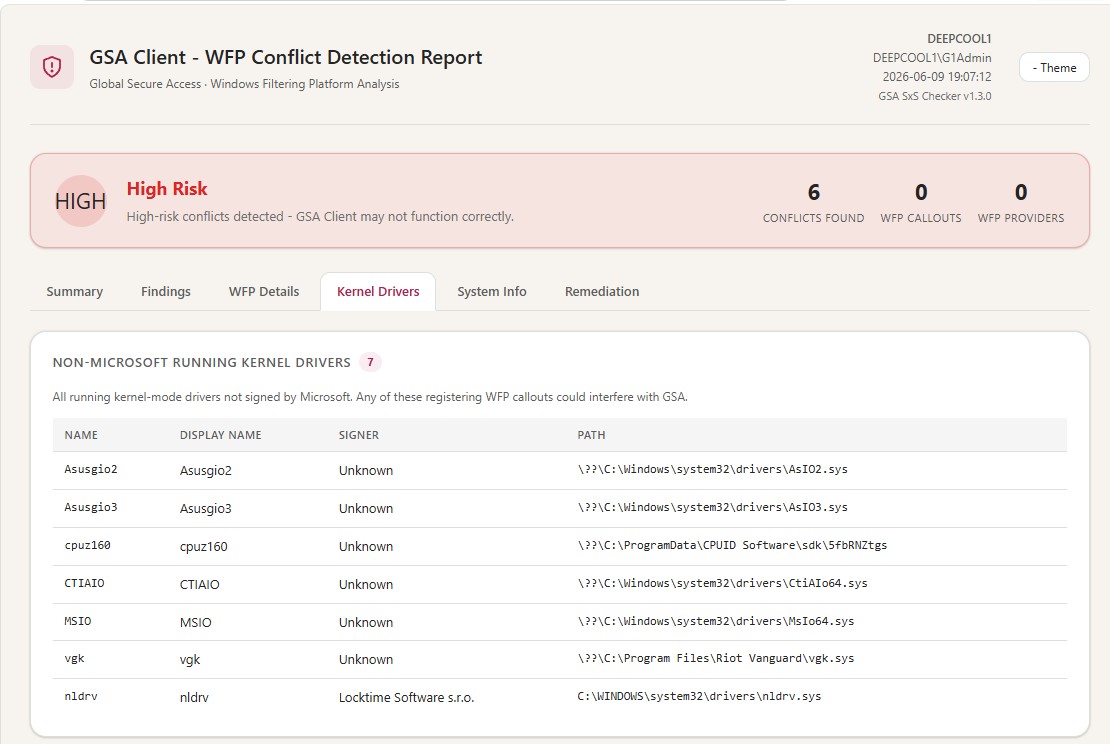
| **Kernel Drivers** | All running non-Microsoft kernel drivers with publisher and signer info |
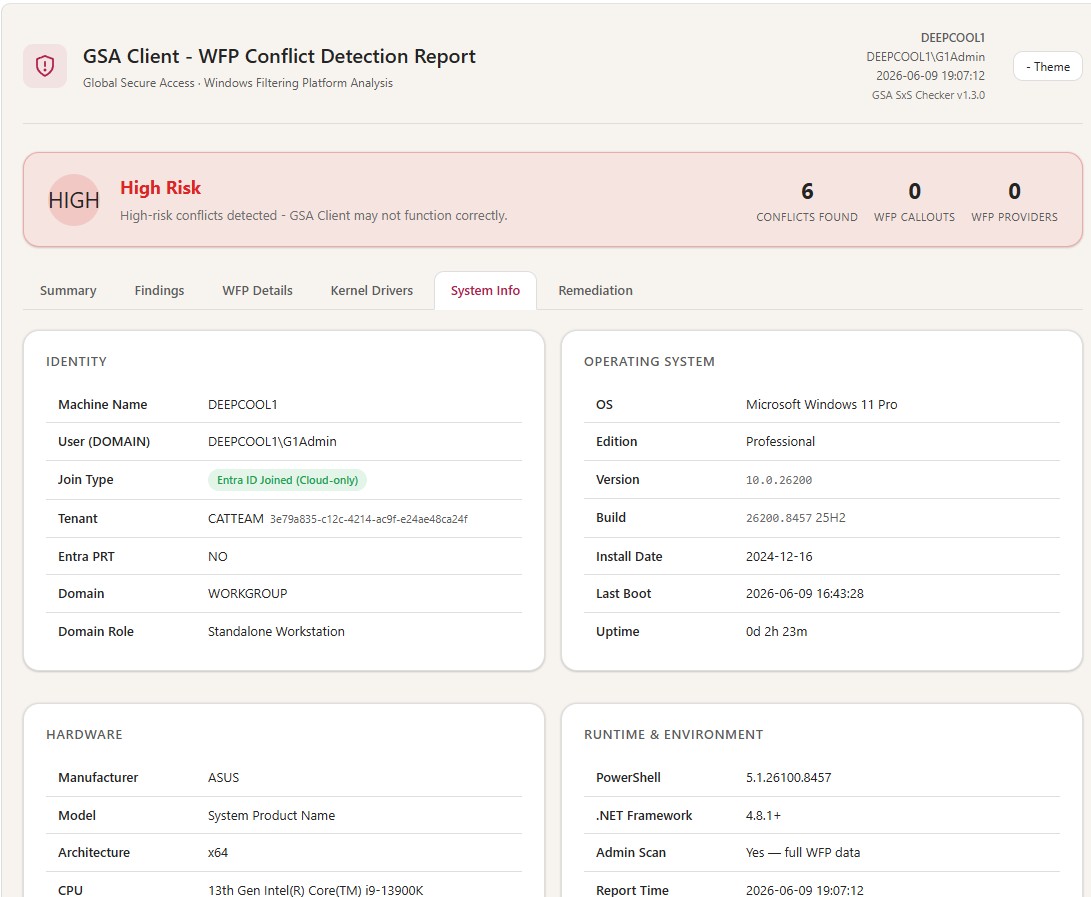
| **System Info** | Identity, OS, hardware, GSA client status, network adapter inventory |
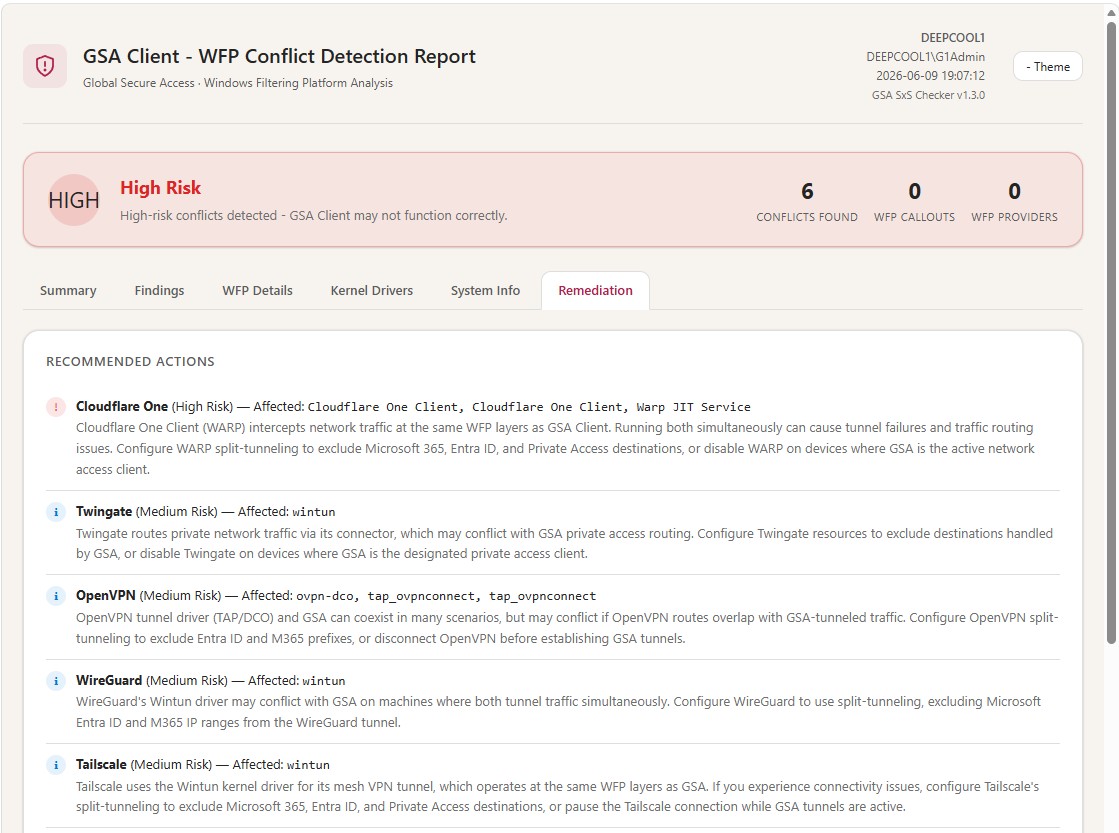
| **Remediation** | Vendor-specific actions and diagnostic commands ready to copy-paste |
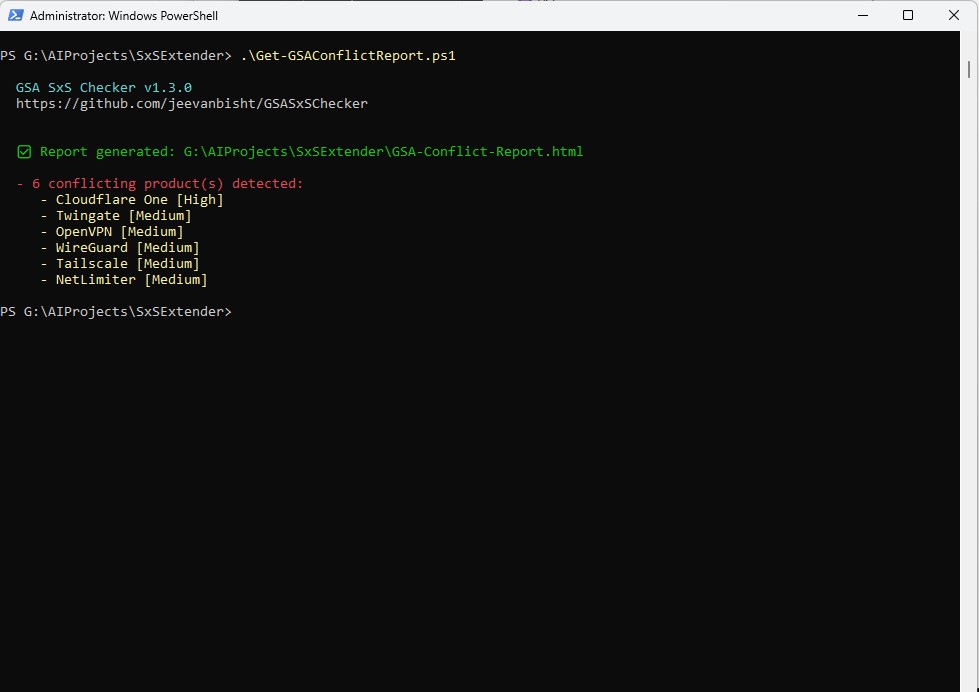
Here's a walkthrough of all six tabs — the demo machine has multiple conflicting vendors installed deliberately to show the risk scoring in action:
Running the script — conflict summary in the terminal
Summary tab — risk banner and detected conflicts
Findings tab — per-vendor risk level and matched drivers
Kernel Drivers tab — all non-Microsoft running drivers with signer
System Info tab — Entra join status, hardware and OS snapshot
Remediation tab — vendor-specific actions ready to copy-paste
The risk banner is actionable rather than decorative — it maps what was found against known conflict severity and tells you exactly what to do next.
## Quick start
```powershell
# Clone the repo or just download the script directly
Invoke-WebRequest -Uri "https://raw.githubusercontent.com/jeevanbisht/GSASxSChecker/main/Get-GSAConflictReport.ps1" `
-OutFile "Get-GSAConflictReport.ps1"
# Run as Administrator for full WFP callout enumeration
.\Get-GSAConflictReport.ps1
```
The report opens automatically. For automation or custom output paths:
```powershell
# Custom path — useful when collecting from a fleet
.\Get-GSAConflictReport.ps1 -OutputPath "C:\Reports\GSA-$(hostname)-$(Get-Date -f yyyyMMdd).html"
# Silent — suppress the browser pop-up
.\Get-GSAConflictReport.ps1 -NoBrowser
# Remote machine — run locally on target, then collect the HTML
Invoke-Command -ComputerName TARGET-PC -FilePath .\Get-GSAConflictReport.ps1
```
Requirements: Windows 10/11 or Server 2016+, PowerShell 5.1 (built in), and Administrator elevation for full results. Without elevation the report still runs — you just lose the WFP Callouts and Providers sections.
## How detection works
The detection pipeline chains five data sources:
| Step | Source | What it collects |
| --- | --- | --- |
| 1 | [`Win32_SystemDriver` (WMI)](https://learn.microsoft.com/en-us/windows/win32/cimwin32prov/win32-systemdriver) | All SCM-registered kernel-mode drivers |
| 2 | [`netsh wfp show state`](https://learn.microsoft.com/en-us/windows-server/networking/technologies/netsh/netsh-contexts) | Live WFP callout + provider enumeration (admin) |
| 3 | Vendor signature matching | 32 curated vendor patterns |
| 4 | GSA registry / services | Version, channel status, [service health](https://learn.microsoft.com/en-us/entra/global-secure-access/troubleshoot-global-secure-access-client-advanced-diagnostics) |
| 5 | [`dsregcmd /status`](https://learn.microsoft.com/en-us/entra/identity/devices/troubleshoot-device-dsregcmd) | Entra ID / Hybrid / On-prem join detection |
Step 3 is what makes the report useful beyond raw data. The script ships with signatures for 32 vendors:
| Category | Vendors covered |
| --- | --- |
| **SSE / SASE / ZTNA** | Forcepoint, Check Point, Skyhigh, Zscaler, Netskope, Cloudflare One, iboss, Appgate SDP, Akamai EAA, Twingate |
| **VPN clients** | Palo Alto Prisma / GlobalProtect, Cisco (Umbrella, Secure Access, AnyConnect, ISE, ASA, Meraki), Citrix Secure Access, Fortinet FortiClient, Ivanti / Pulse Secure, F5 BIG-IP Edge, SonicWall, OpenVPN, WireGuard, Tailscale |
| **Endpoint security** | Sophos, Absolute / NetMotion, Trellix, Symantec, CrowdStrike, SentinelOne |
| **Other** | NetLimiter |
Each signature encodes the known driver/service names, the WFP callout layers the product uses, and the typical conflict behaviour — so the Findings tab can tell you *why* a specific product is a problem for GSA, not just that it was detected.
## Scope and limitations
The tool is deliberately focused. It detects [WFP callout drivers](https://learn.microsoft.com/en-us/windows/win32/fwp/callout-drivers) that are registered through the standard [Windows Filtering Platform API](https://learn.microsoft.com/en-us/windows/win32/fwp/windows-filtering-platform-start-page) and visible to the [Service Control Manager](https://learn.microsoft.com/en-us/windows/win32/services/service-control-manager). It does **not** detect:
- Drivers loaded without SCM registration
- Non-WFP hooks such as [NDIS filter drivers](https://learn.microsoft.com/en-us/windows-hardware/drivers/network/ndis-filter-drivers) or LSPs
- Conflicts that only manifest under specific traffic conditions
That scope is intentional — it covers the vast majority of real-world GSA deployment conflicts, and keeps the script dependency-free and fast.
## Official Microsoft coexistence guidance
For several of the vendors detected by this tool, Microsoft publishes dedicated coexistence guides covering configuration steps, known limitations, and recommended deployment patterns:
- [Coexistence with Cisco Umbrella](https://learn.microsoft.com/en-us/entra/global-secure-access/how-to-cisco-coexistence?tabs=cisco-umbrella-portal)
- [Coexistence with Cisco Secure Access](https://learn.microsoft.com/en-us/entra/global-secure-access/how-to-cisco-coexistence?tabs=cisco-secure-access-portal)
- [Coexistence with Cisco VPNs](https://learn.microsoft.com/en-us/entra/global-secure-access/how-to-cisco-coexistence?tabs=cisco-vpn)
- [Coexistence with Palo Alto Networks](https://learn.microsoft.com/en-us/entra/global-secure-access/how-to-palo-alto-coexistence)
- [Coexistence with Zscaler](https://learn.microsoft.com/en-us/entra/global-secure-access/how-to-zscaler-coexistence)
- [Coexistence with Netskope](https://learn.microsoft.com/en-us/entra/global-secure-access/how-to-netskope-coexistence)
These are the starting point once the checker flags a conflict — they document whether the two products can run together and, if so, exactly how to configure both sides.
---
**Source:** [github.com/jeevanbisht/GSASxSChecker](https://github.com/jeevanbisht/GSASxSChecker) — MIT licensed, single-file PowerShell script.